Showing posts with label wifi. Show all posts

Wednesday, September 16, 2009

ath5k: now in Master mode !

This is a good news for those who have had big troubles with their Wireless drivers on the alix box.
Finally, from kernel 2.6.31, ath5k supports master mode !

At the time I am writing, kernel26 2.6.31 is not yet in the core repository for arch linux, thus you'll have to get it from the testing branch.

I did different tests with multiple computers/iPhone, this works amazingly well, I reach speeds like never before !

Before, I had ath_pci and ath5k cohabiting on the same system. ath5k was complaining about a noise calibration problem:

ath5k phy0: noise floor calibration timeout (2412MHz)

However, what was weird was that the connection between my laptop and the router was dramatically slowed down as well. As a remember, I was using ath_pci for the card that linked the router to my laptop and ath5k for the card that linked the router to the wireless access point. My conclusion was that ath5k and ath_pci work together somehow.
By removing ath_pci from my system, the messages disappeared and my connection became way better. Of course, I did not have access to the router anymore.

Now that ath5k provides master mode (through hostapd), everything is solved and I have very nice speeds between both links, ie laptop to router and router to ap.

Wednesday, August 12, 2009

9 hardcore tips to boost your Wifi signal [that normal people don't know about]

I'm not going to speak about adding an antenna or adding a repeater to increase your signal. This topics are trivial and well covered (just see here for instance). Instead, we will look at different optimizations for signal gain, that you probably were not aware of.
In this topic, I will mostly address the problem you might have when dealing with a medium distance access point (like your neighbour for example).


Antenna related

1) The antenna is probably the first tool you will need to have a descent signal. Choosing a good antenna does depend on the place where you live. For example, if you live in a very dense city, it makes no sense to use a 26dbi parabolic dish. Instead, you will prefer a Yagi or a panel antenna. Looking at the radiation pattern of the antenna will help you understanding what is the best for you. Moreover, if you have a high gain antenna, you will face up the hidden terminal problem. So don't fall in the trap of "the biggest the best". Of course, it will be a good idea to put your antenna outside, ie on your balcony or on the window edge.

2) Avoid using too many connectors. Indeed, every time you use a connector (or a pigtail), a large part of the signal is lost. Prefer only one wire, directly connected from your access point(AP)/card to the antenna.

3) Use very small cables. I'm always amazed when I see people on ebay selling Yagi antenna with 30 meters of coax cable. A good low-loss cable has a loss of around 0.4db/meter, it means that if you have 30 meters of cable, you are loosing 12dbi. So what's the point of having a 19dbi antenna then ?

4) The polarization of the antenna is something people usually don't care. However, a "mis-polarized" antenna can have tremendous damages on your signal If you don't know what "polarization" is, just think about your polarized sunglasses. Basically, the glasses let only pass certain type of waves. In wireless it's the same: if someone is emitting a vertically (linearly) polarized wave and you set up your antenna horizontally, you will miss the signal.
If you still don't understand what this "polarization" is, the best way to proceed is by "trial and error": turn your antenna all the way around until your get the maximal strength.
The following antenna has an horizontal polarization (source: Wikipedia), for some obvious reasons. If you take another parabolic antenna and you turn it to have a vertical polarization, you won't be able to get any signal.

However, waves might change polarization when they hit objects, so don't go too crazy with that. Usually, omnidirectional antennas are low profile antennas and tempts to have a circular polarization. Based on my observation, I would say that the vertical polarization is predominant, though.

Note that it doesn't mean because your are pointing to the AP that you will get the maximum strength (this is only true for parabolic antennas). In the future, we will see how to measure the signal in a pretty accurate manner.


802.11 & hardware related

5) If you can change the AP channel, try to take one that is not over-used in your neighbourhood. You can figure this out by counting the number of access points that are on the same channel, by using kismet for example. This makes sense, since data is braodcasted, the more people will use the same channel (even with different APs), the more collisions there will be. Note that the channels go by group of 3, like on this figure. Thus, channel 1 and 3 lie on the same frequency band, but channel 1 and 5 don't. Usually, people don't change their channel, and leave the default one (usually 6 or 1), so switching to channel 14 seems to be a good plan. Of course, if you can go 5GHz, go 5GHz, there will be even less people on there.


6) Many times, changing channel does not help, because they are all busy and a lot of people are using them. In this case, enabling RTS/CTS (Request to Send / Clear to Send) will definitely help. Basically, when a client wants to send a packet, it first sends a RTS to make sure nobody is using the channel. Then, the AP replies with a CTS to confirm that it (the client) can send its packet.
RTS/CTS is usually disabled (ie set at a very high value). If the channel is very busy, you'll need to decrease the RTS/CTS threshold, at 500b for example, meaning that a RTS will be sent only for packets >= 500b. You'll increase the overhead, but ultimately you'll transmit more packets (and avoid the hidden node problem).

To understand better why the RTS/CTS is needed, let's take this example: suppose that you are in a restaurant. If it's crowded, there will be a lot of people speaking at the same time (ie channel "busy"). By analogy - if you assume that the restaurant is the channel you are using and the people speaking are the clients using this channel - when using RTS/CTS mechanism, we take care that no other people are speaking. It's like saying "Now I'm speaking, please shut up (RTS)" to everyone in the restaurant, and the person to whom you are speaking would reply (once everybody is silent) "OK, I let you speak now, go ahead (CTS)". Of course, if you are alone in the restaurant, there is no need to say that. Well, don't do it in real life, it might be weird...

7) We have seen that when a channel is busy, we can enable the RTS/CTS mechanism. However, sometimes the link is BAD, meaning there is a lot of white noise on the line. Basically, you might have a good signal, but a lot of noise, decreasing your signal/noise ration (SNR). The trick here is to transmit smaller packets. Suppose that you are sending BIG packets and the noise destroys a packet with a certain probability, you will loose more data (and hence need to retransmit) when these packets are big rather than small. Well, this doesn't work linearly like that, but you got the idea. It means that if the packet is smaller, there will be less to retransmit. This setting can be changed through the fragmentation threshold.

That's interesting to notice that your microwave oven is running at around 2GHz and Wifi is operating at 2.4GHz. Microwave ovens are studied to maximize the absorption by water (to warm it), and it happens to be at around 2GHz. What does it mean ? It means that when it's rainy, the signal is lost in... the rain, or in other words, the Wifi is somehow warming the rain. Thus, humidity acts as a wireless barrier.

8) Have you ever looked at a wireless chip datasheet ? Here is a snippet.


What ca we see from the datasheet ?
  • The output power is maximized when the data rate is low.
  • The sensibility is maximized when the data rate is low (ie 1Mbps).
It makes sens to set the AP between 1->6Mbps, doesn't it ? We will increase the sensibility (ie we will "receive better"), and also increase the output power (ie we will "better send"). However, if you decrease *YOUR* bit rate, you will reserve the channel longer and thus, other people will see a drop down in their maximal bitrate.

9) Decrease the power of your AP: if you are living in a very tiny place and you have access to the tx power (you are using dd-wrt for example), you can decrease it. Indeed, you will radiate less and thus you will decrease the problems you might have with the neighbourhood (with RTS/CTS for example, avoiding the exposed terminal problem).

9.2) Finally, when dealing with multiple user connected to an AP, we can hack the wireless driver to gain priority. Basically, there exist techniques to reserve the channel more than usual (ie greedy user) and this will probably be a topic I'll discuss on this blog.


We are the end of our wifi-tips. I hope your learned something new and feel free to leave your impressions/comments.

Saturday, July 18, 2009

alix3d3: towards an access point

Now that we have a running operating system (Arch linux in this case), the next step I would like to do is to configure my box as an access point, to act as my old dd-wrt router.

There are already good topics on the subject, like here or here.

To test my network, I am using 3 computers (you can do it with VMs though):
  1. A laptop: it will be my "client".
  2. A fix computer: it will act as my ISP.
  3. Alix3d3: it will act as my wireless access point (WAP).
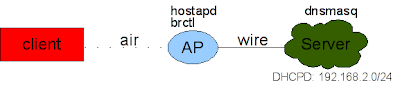
As you can see in the picture, the client connects to the WAP by the air (hence the name :P) and the AP connects to the server with a wire. The server runs a simple dhcp server.

To have this configuration, here is what we need to do:

On the server, we need to install the dhcp server. I decided to use dnsmasq, because it is very easy to configure and fits well for my small network.

To do so, on the server, simply add to your /etc/dnsmasq.conf the next lines. Note that it is not mandatory to explicitly write the interface, but I find it cleaner. The log-dhcp will bring helpful information about what is going on, in /var/log/message (just do a 'tail -f' on it).

dhcp-range=192.168.2.50,192.168.2.150,3d
interface=eth0
log-dhcp

Once you set it up, you boot the dnsmasq service, usually by doing something like
ifconfig eth0 192.168.2.1
/etc/init.d/dnsmasq start
You can test that everything is working properly, by connecting the alix3d3 board to the server and run a

dhcpcd eth0

Now that we have a dhcp server available, we need to configure the access point. To make it simple, I decided to configure the simplest access point, ie without any encryption (for now).

The wireless card is using the madwifi driver. As you know, madwifi does not do exactly follow the same way as the other drivers, since it is using its wlanconfig tool.
Basically, since we want to set our card as an access point, we have to do:

wlanconfig ath0 destroy
wlanconfig ath0 create wlandev wifi0 wlanmode ap

Now you have your card in master mode, you can verify it by doing a iwconfig.

To me, an access point only offers the "wire". In a sense, it is like when 2 people do not speak the same language, and a person comes in the middle speaking both languages. The first person speaks to the person of the middle whose will translate it to the second person.

In our case, a bridge will do the job: all the data coming in the air will be passed to wire and vice-versa. This is not a big deal to make one, the man page of brctl describes it pretty well.


brctl addbr br0 # creates the bridge
brctl addif br0 eth0 # adds eth0 to the bridge
brctl addif br0 ath0 # adds ath0 to the bridge
brctl show # shows what we did
bridge name bridge id STP enabled interfaces
br0 8000.000db917b374 no ath0
eth0
To set up the access point, we will use hostapd, the IEEE 802.11 wireless LAN Host AP daemon.

To make it simple, here is my configuration for /etc/hostapd/hostapd.conf. I did not change the default values, I just modified the ssid to pliplop and modified the interface correctly (ath0).


interface=ath0
bridge=br0
driver=madwifi
logger_syslog=-1
logger_syslog_level=2
logger_stdout=-1
logger_stdout_level=2
dump_file=/tmp/hostapd.dump
ctrl_interface=/var/run/hostapd
ctrl_interface_group=0
ssid=pliplop
hw_mode=g
channel=1
beacon_int=100
dtim_period=2
max_num_sta=255
rts_threshold=2347
fragm_threshold=2346
macaddr_acl=0
auth_algs=3
ignore_broadcast_ssid=0
wme_enabled=1
wme_ac_bk_cwmin=4
wme_ac_bk_cwmax=10
wme_ac_bk_aifs=7
wme_ac_bk_txop_limit=0
wme_ac_bk_acm=0
wme_ac_be_aifs=3
wme_ac_be_cwmin=4
wme_ac_be_cwmax=10
wme_ac_be_txop_limit=0
wme_ac_be_acm=0
wme_ac_vi_aifs=2
wme_ac_vi_cwmin=3
wme_ac_vi_cwmax=4
wme_ac_vi_txop_limit=94
wme_ac_vi_acm=0
wme_ac_vo_aifs=2
wme_ac_vo_cwmin=2
wme_ac_vo_cwmax=3
wme_ac_vo_txop_limit=47
wme_ac_vo_acm=0
eapol_key_index_workaround=0
eap_server=0
own_ip_addr=127.0.0.1


We are ready to launch the hostap deamon...

Everything sounds to be working by now. We will try connect with the client now.


iwconfig wlan0 essid pliplop
dhcpcd wlan0
wlan0: dhcpcd 4.0.13 starting
wlan0: broadcasting for a lease
wlan0: offered 192.168.0.82 from 192.168.0.1
wlan0: ignoring offer of 192.168.2.82 from 192.168.2.1
wlan0: acknowledged 192.168.0.82 from 192.168.0.1
wlan0: checking 192.168.0.82 is available on attached networks
wlan0: leased 192.168.0.82 for 259200 seconds


ifconfig wlan0
wlan0 Link encap:Ethernet HWaddr 00:15:6d:53:01:d2
inet addr:192.168.2.82 Bcast:192.168.2.255 Mask:255.255.255.0
UP BROADCAST RUNNING MULTICAST MTU:1500 Metric:1
RX packets:4235 errors:0 dropped:0 overruns:0 frame:0
TX packets:4179 errors:0 dropped:0 overruns:0 carrier:0
collisions:0 txqueuelen:0
RX bytes:2448884 (2.3 MiB) TX bytes:372396 (363.6 KiB)


As you can see, we received an ip address 192.168.2.82, which is in the pool of IP addresses we set up before on the server. We see that the access point acts transparently, like if we had pulled a direct wire between the client and the server. It is also worth to notice that on the alix3d3, you did not give any ip address neither for the eth0, nor for the ath0 interfaces. This makes sense, since IP addresses are one layer above the one we are working with.

Finally, if you want to configure your alix3d3 further on, you can do a for example a dhcpcd br0 on the WAP: the server will offer it an IP address and you'll be able to access it.

This is not too bad for the moment, but I my alix3d3 to act not only as an access point, but also as a router, thus I'll be able to do more advanced features. The next step is thus to configure a router on top of that.